Tailwind CSS 4 Default Mode Reference
The current version of weapp-tailwindcss has organized configuration and documents according to the Tailwind CSS 4 generation mode by default. This page is not a new quick start entry, but a supplementary explanation of CSS-first, @source, cssEntries, @apply, @layer, IntelliSense and multi-port compatibility details that still need to be understood in default mode.
When accessing for the first time, please start from [Installation Dependencies] (/docs/quick-start/install) and the corresponding framework registration page; when migrating an older project, return to this page to check the configurations that need to be retained or deleted.
This page only maintains instructions related to the default generation mode of Tailwind CSS 4.
Positioning changes: style preprocessor
tailwindcss@4 has significant changes in positioning
It directly becomes a style preprocessor, which is combined with the native css and its specifications to complement each other.
So you should not use 4.x with tailwindcss, sass, less in the stylus version
See: https://tailwindcss.com/docs/compatibility#sass-less-and-stylus
Integration selection
Various options are available on tailwindcss integration (cli, vite, postcss). In the generation mode of weapp-tailwindcss@5, most small program projects no longer directly register these official Tailwind build plug-ins, but only register weapp-tailwindcss's own builder plug-in:
- Vite project registers
weapp-tailwindcss/viteofWeappTailwindcss. - Webpack project registers
weapp-tailwindcss/webpackofWeappTailwindcss. - Tailwind CSS 4 reads the configuration and generates the target CSS by
WeappTailwindcss. - The
postcss.config.jsor@tailwindcss/postcssPostCSS plug-ins are no longer registered intailwindcss.
This can avoid having two sets of Tailwind generation links in the same build at the same time: the official Tailwind plug-in generates the browser CSS once, and weapp-tailwindcss tries to post-process it twice. The generation mode will directly output the applet target CSS, and let the template/JS class name translation share the same classSet.
Mpx also uses weapp-tailwindcss/webpack's WeappTailwindcss to take over CSS generation, templates and JS transpilation. Do not register additional PostCSS generation plugins for Tailwind CSS.
Mini program style entrance
In the v5 generation mode, the mini program CSS entry directly writes @import "tailwindcss", and WeappTailwindcss will generate the mini program target CSS according to the default target: 'weapp'. If you still see @import "weapp-tailwindcss/index.css" in existing projects, it is recommended to migrate to Tailwind’s official CSS-first entry writing method.
Why write @import "tailwindcss" uniformly?
tailwindcss@4's configuration, theme variables, and scan scope are all read from the CSS entry. Unified use of @import "tailwindcss" allows Tailwind official IntelliSense, @source, @theme and WeappTailwindcss generators to read the same entry. Selectors, @layer and browser preflights that are not supported by the mini program or are not suitable for direct retention will be processed when WeappTailwindcss outputs the mini program CSS.
Multi-terminal development
If you need to carry out multi-terminal development, you can use the style conditional compilation writing method of the corresponding framework, such as uni-app:
For multi-terminal or multi-build entry projects such as uni-app / uni-app x / Taro / Both ends can share the same CSS file containing Mpx, Weapp-vite and WeappTailwindcss, but do not register two sets of Tailwind generation plug-ins in the same multi-end build at the same time. Only when independent web applications do not build links through mini programs, it is suitable to continue to use Tailwind's official Vite/PostCSS plug-in alone.
See https://uniapp.dcloud.net.cn/tutorial/platform.html for details
css as configuration file
Since in tailwindcss@4, the configuration file defaults to an css file, you need to allow weapp-tailwindcss to stably find your entry css file.
Tailwind CSS 4 projects should explicitly configure cssEntries to maintain consistent processing modes for weapp-tailwindcss and tailwindcss. Multiple entries, sub-packaging, independent sub-packaging, Webpack, Gulp, custom builds and multi-platform builds should clearly write these entries and use the absolute path resolved from the project root directory. cssEntries is only responsible for entry identification, and the entry CSS still needs to be actually imported by the project or included in the build diagram.
cssEntriesis an array, which is the CSS entry files you write@import "tailwindcss";in. There can be multiple. Please use absolute paths.
{
  cssEntries: [
// Tailwind CSS entry file
// Such as tarojs
    path.resolve(__dirname, '../src/app.css')
// For example, uni-app (no app.css needs to be created first, and then imported by the `main` entry file)
    // path.resolve(__dirname, './src/app.css')
  ],
}
Don't leave out cssEntries. Once the building diagram is split, sub-packaged CSS is output independently, or the platform product name changes, the lack of explicit entry may result in CSS not being generated and JS string classes being translated but lacking corresponding styles.
Please only place the entry of tailwindcss@4 in the .css file, such as app.css.
Do not point @import "tailwindcss" or the corresponding cssEntries to preprocessed style files such as scss,
The recommended approach is:
- Create a new pure
cssentry file, such assrc/app.css - Only write
cssin this@import "tailwindcss";file - Let
scss/lessin the business indirectly reference thiscss, or introduce it from the main entry file
The plug-in will automatically enable v4 mode based on the installed Tailwind version. Only when debugging a custom
tailwindcssdirectory or when multiple versions coexist, you need to manually specifytailwindcssin theversionconfiguration.
Use @apply
If you want to use CSS or @apply in a page or component-independent @variant module, you need to use the @reference directive to import theme variables, custom tools, and custom variants to make these values available in that context.
/* Relative path to the css you introduced tailwindcss */
@reference "../../app.css";
/* If you only use the default theme without customization, you can directly reference tailwindcss */
@reference "tailwindcss";
See: https://tailwindcss.com/docs/functions-and-directives#reference-directive
@layer downgrade plan in mini program
tailwindcss@4 uses native @layer to control style priority
If you don’t know what
@layeris, you can read this document https://developer.mozilla.org/zh-CN/docs/Web/CSS/@layer
However, frameworks like uni-app / taro directly introduce many built-in styles by default.
So the following embarrassing situation will occur: the (0,1,0) selector style of priority class cannot override the label selector style of (0,0,1):
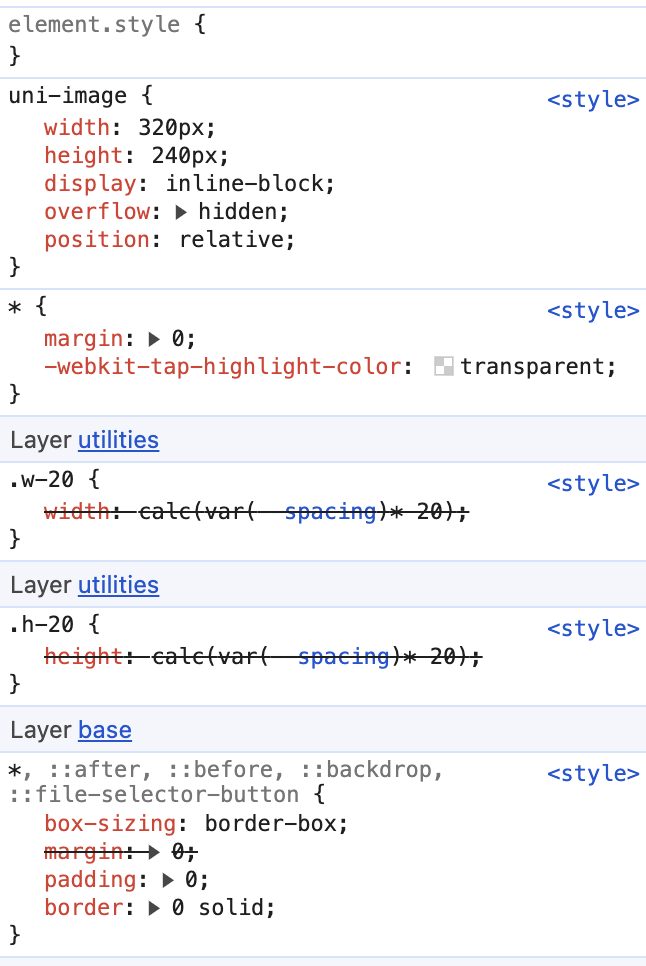
In this case, you really need a compatibility downgrade solution, that is, using postcss-preset-env (weapp-tailwindcss already has this plug-in built in, which can be configured through cssOptions.cssPresetEnv).
This is important when developing projects that need to be compatible with lower versions of mobile h5.
Use pnpm
When pnpm is used by default, ghost dependencies cannot be used because pnpm
However, uni-app/taro needs ghost dependencies for some historical reasons. At this time, you can create .npmrc under the project and add the following content
shamefully-hoist=true
Then re-execute the pnpm i installation package to run
Smart Tips
Currently, the VS Code tailwindcss@4 plug-in of Tailwind CSS IntelliSense will give priority to deriving configuration and candidate class names from the Tailwind entry it recognizes.
In small program projects, it is now recommended to write @import "tailwindcss"; directly. This not only complies with the CSS-first entry of Tailwind CSS 4, but also allows WeappTailwindcss to output the applet target CSS in generation mode.
For related fixes, please pay attention to this PR:
According to the current implementation of tailwindcss-intellisense, what really works is to explicitly configure tailwindCSS.experimental.configFile. For tailwindcss@4, what is passed in here is not tailwind.config.js, but your CSS entry file.
If the project has only one entry, just point it directly to the one actually used, app.css:
{
  "tailwindCSS.experimental.configFile": "src/app.css"
}
After this configuration, the extension will directly load src/app.css as the Tailwind 4 project entry, and restore completion, floating prompts and diagnosis.
If your project has multiple Tailwind entries, use object writing instead to map each CSS entry to the corresponding file scope:
{
  "tailwindCSS.experimental.configFile": {
    "packages/a/src/app.css": "packages/a/src/**",
    "packages/b/src/app.css": "packages/b/src/**"
  }
}
If you still want to create an additional CSS file that is only used by the editor, you must also write this file into tailwindCSS.experimental.configFile. Simply introducing it in App.vue will not bind IntelliSense to that entry.
The following is an alternative way to write an editor-specific entry:
@import "tailwindcss";
@source not "dist";
@source not "../src/uni_modules";
{
  "tailwindCSS.experimental.configFile": "src/main.css"
}
This main.css is only used for IntelliSense and does not need to and should not be introduced in the actual application entry. The real entrance to the business is still app.css in your @import "tailwindcss".
You must use @import "tailwindcss" here, not @import "weapp-tailwindcss/index.css" or @import "weapp-tailwindcss/theme.css". The reason is that in the current source code of tailwindcss-intellisense, what really determines whether to load the system according to v4 design is packages/tailwindcss-language-server/src/util/v4/design-system.ts in isMaybeV4(), which only checks:
@import "tailwindcss"@theme {}
That is to say:
@import "weapp-tailwindcss/index.css": This v4 recognition will not be triggered@import "weapp-tailwindcss/theme.css": also does not trigger@import "tailwindcss": v4 IntelliSense can be triggered stably
If your project is not the dist directory, but other output directories such as unpackage, build, etc., please change @source not "dist"; to your actual product directory.
uni-app scan range troubleshooting in uni-app x / @source projects
Problem phenomenon
When the uni-app project places third-party plug-ins or dependencies under src/uni_modules, or the HBuilderX /
The end result is usually not that the business code actually writes these class names, but that there are many meaningless styles in the product, which increases the cost of troubleshooting.
Root cause
The root cause is that the scanning scope is too wide, and third-party source code, README sample text or built products are mistakenly regarded as candidates.
Recommended configuration
Command line uni-app project recommendation:
@source not "../src/uni_modules";
HBuilderX / uni-app x project recommendations:
@source not "uni_modules";
Also retain the exclusion of the actual build product directory, for example:
@source not "dist";
or:
@source not "unpackage";
Best Practices
@sourceshould try to only cover the business source code directory- Exclude
uni_modules,node_modules,dist,unpackage, documentation and build products by default - If you must scan a certain
uni_modulespackage, you should only include the exact file that actually carries the template class name, rather than scanning the entire directory
Note: Judging from the source code of
tailwindcss-intellisense,experimental.configFilesupports two forms,stringandobject, under v4, and the path will be resolved relative to the workspace or.code-workspacefile. The key is to "explicitly declare the CSS entry", and the entry itself must meet its v4 recognition conditions.
How to remove preflight style
When using @import "tailwindcss", WeappTailwindcss will inject the basic reset available to the applet according to the current Tailwind main version.
What is preflight style
Some global reset styles are used to make some tags behave uniformly, such as what you see in your styles:
view,text,::before,::after,::backdrop {
  box-sizing: border-box;
  margin: 0;
  padding: 0;
  border: 0 solid;
}
Something like this is the weapp-tailwindcss style that preflight injects into your application.
Solution
If you confirm that you do not need this basic reset, you can turn it off in WeappTailwindcss:
WeappTailwindcss({
  cssOptions: {
    cssPreflight: false,
  },
})
If you only want to override part of the declaration, you can pass in an object to override the default value, for example:
WeappTailwindcss({
  cssOptions: {
    cssPreflight: {
      margin: '0',
      padding: '0',
    },
  },
})
Invalid problem using uppercase units (h-[100PX])
By default, at process.env.NODE_ENV === 'production', Tailwind CSS v4 will enter optimization mode and may calibrate CSS units, such as converting uppercase PX to lowercase px.
In the current default build mode, do not additionally register @tailwindcss/postcss or the official Vite plugin to preserve uppercase units. A safer approach is to change the business style to the rpx / px writing method recommended by the mini program, and use the target end to build the product to confirm that the final unit meets expectations.